
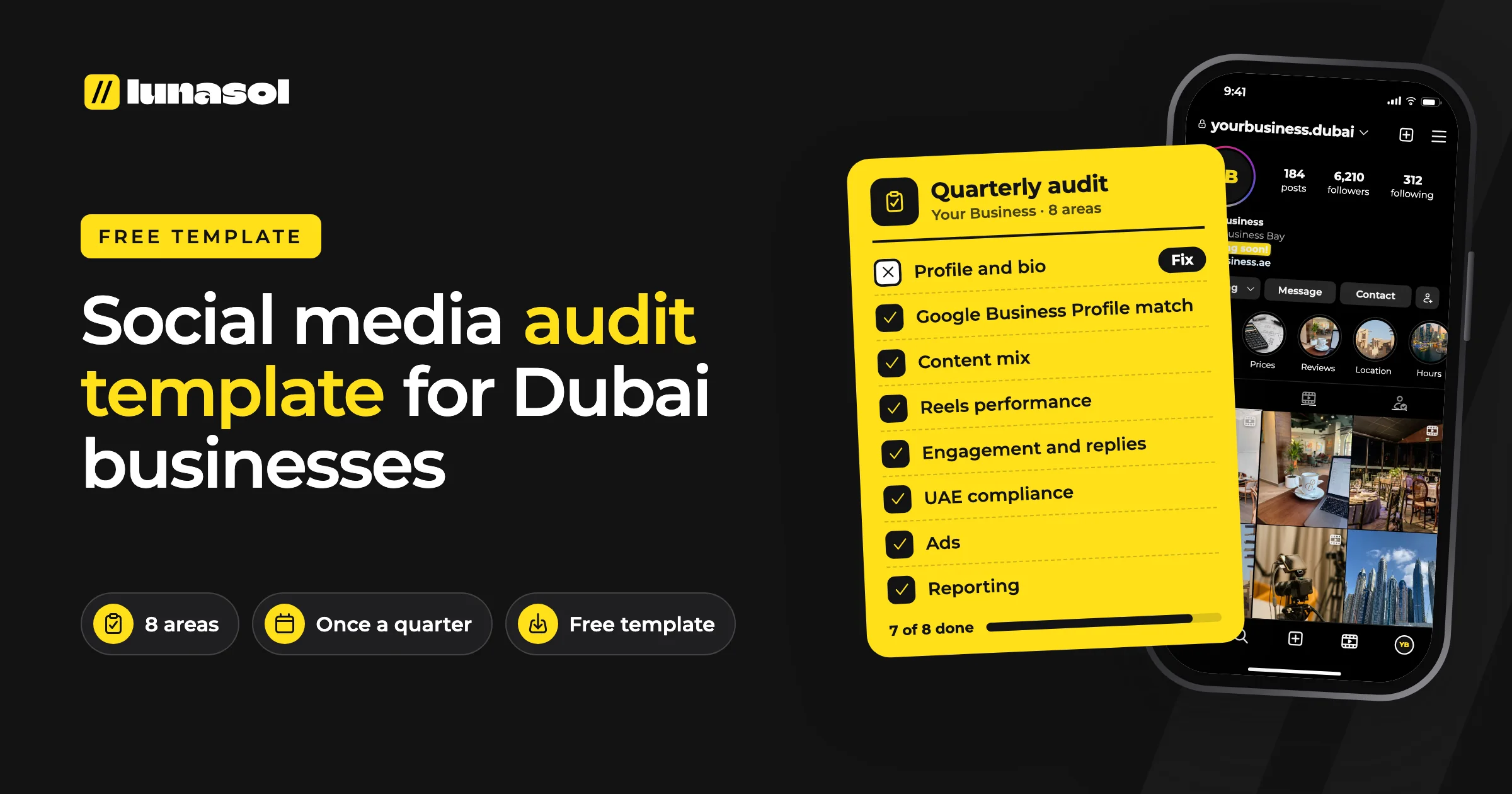


A social media audit template is a checklist you run once a quarter to see if your accounts are helping or hurting your business. For a Dubai business, check eight areas: profile and bio, your Google Business Profile match, content mix, Reels, replies, UAE compliance, ads and reporting. The full checklist and a free template are below.
Here's how it usually goes. A potential customer finds you on Google Maps, taps through to your Instagram, and your bio still says "Opening soon". You opened two summers ago.
Nobody meant for that to happen. Accounts drift. The person who set them up moved on, the phone number changed, and the last Reel went out before the summer. An audit is simply the hour where you look at your accounts the way a stranger does.
What does a social media audit check?
A social media audit checks whether your accounts are accurate, active, compliant and measured. We use eight areas, and the first two are quick and often catch the most embarrassing problems.
| Area | The question it answers | Where to look |
|---|---|---|
| 1. Profile and bio | Would a stranger know what you do and how to contact you? | Your profile, viewed from a friend's phone |
| 2. Google Business Profile match | Do your name, address and phone match everywhere? | Google Maps, website, Instagram, Facebook |
| 3. Content mix | Are you posting enough, in the right formats? | Instagram Insights, "Content you shared" |
| 4. Reels performance | Do people watch and then follow? | Reel insights: views, watch time, follows |
| 5. Engagement and replies | Do people interact, and do you answer them? | Insights, comments, DM inbox |
| 6. UAE compliance | Do creators and property ads have the right permits? | National Media Authority and Dubai Land Department rules |
| 7. Ads | What ads are live, and who owns the ad account? | Meta Ad Library, Ads Manager |
| 8. Reporting | Can you see what changed since last quarter? | Your monthly report or your own export |
1. Profile and bio: what should a business Instagram bio show?
Your bio should tell a stranger, in one glance, what you do, where you are and how to reach you. Open your profile on someone else's phone while logged out of your own account. That's the view your customers get.
| Check | What good looks like | Status |
|---|---|---|
| Profile photo | Your logo or shopfront, clear at small size | Pass / Fix |
| Name field | Your business name plus what you do, e.g. "Name | Dental clinic, Jumeirah" | Pass / Fix |
| Bio line | Who you help and where, in plain words, with nothing "coming soon" that already came | Pass / Fix |
| Link | Goes to a working page on your website, not an old campaign | Pass / Fix |
| Contact buttons | Call, email and WhatsApp all reach a person today | Pass / Fix |
| Highlights | Services, prices or menu, reviews, location; no stale event highlights | Pass / Fix |
Tap every button yourself. A broken WhatsApp link costs you enquiries quietly, which is the worst way to lose them.
2. Do your name, address and phone match your Google Business Profile?
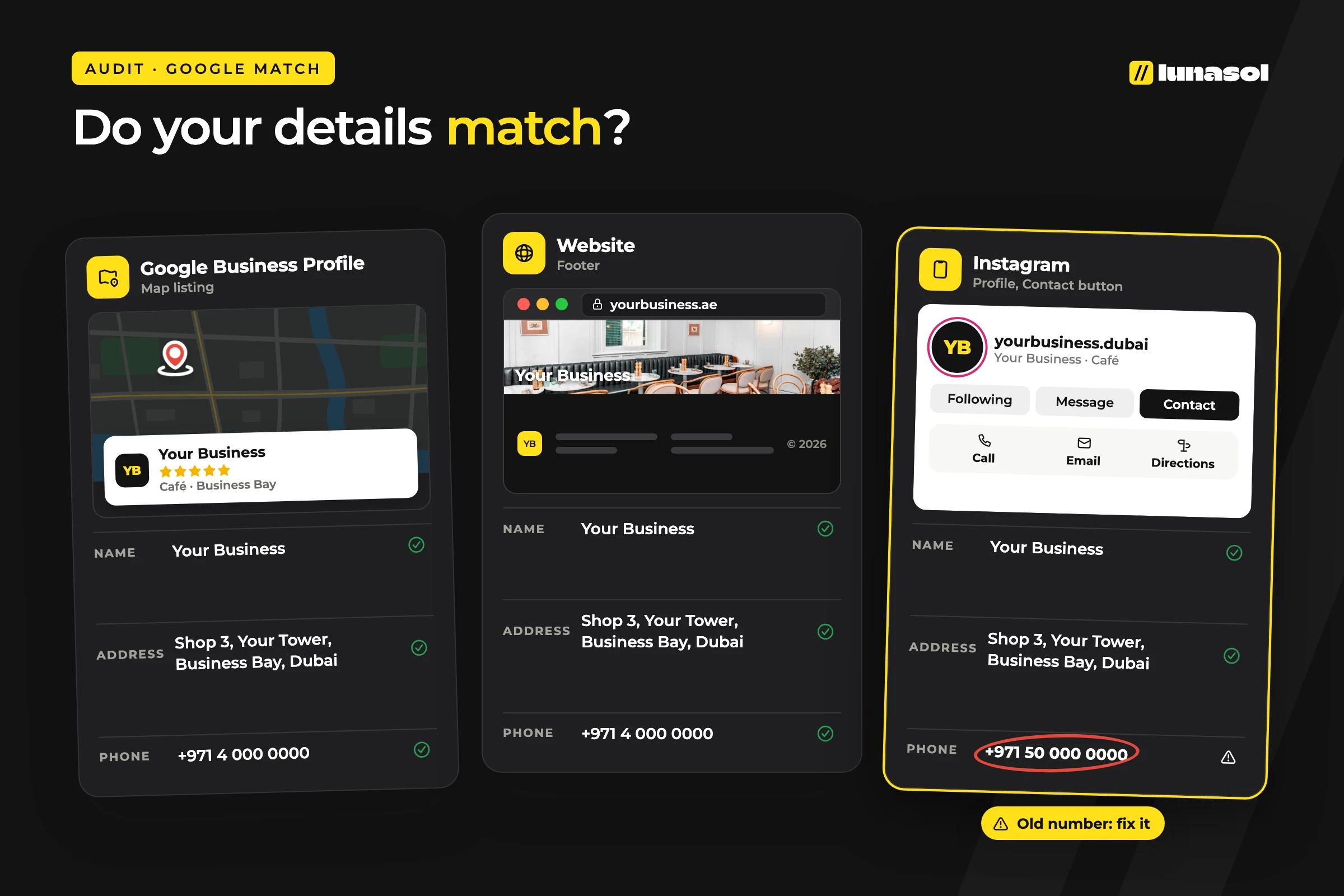
Your business name, address and phone number should be identical on your Google Business Profile, your website, Instagram and Facebook. Google's own guidelines say your name should be the one used "consistently on your storefront, website, stationery".
The Google Business Profile guidelines also ask for "a precise, accurate address" and a phone number that connects to your individual business location. So if your Instagram shows a mobile number from your first office and Google shows the landline, one of them is wrong.
| Field | Google Business Profile | Website / Instagram / Facebook |
|---|---|---|
| Business name | Copy exactly | Same spelling, same order |
| Address | Building, floor, area (e.g. Business Bay) | Same building name and area |
| Phone | Local number for this location | Same number |
| Hours | Current, including holiday hours | Same hours |
| Website | Main domain | Same domain |
We wrote a full guide on what to do when your Google Business Profile and website disagree. Fix the source first, then the copies.
3. Content mix: are you posting enough of the right things?
Check how many Reels, posts or carousels and Stories you published in the last 90 days, and whether they cover more than one topic. Instagram's "Content you shared" insight counts what you posted in any timeframe within the past 90 days, according to Instagram's help page on insights.
- Count each format: Reels, posts or carousels, Stories.
- Sort your posts into 3-4 themes (for example: services, proof, behind the scenes, tips). If one theme is 80% of the grid, your feed reads like a brochure.
- Check for gaps longer than two weeks. Those are the weeks a new visitor assumes you closed.
For a benchmark, our Essential plan, from AED 2,500 per month, covers 8 Reels or short videos, 8 posts or carousels and 16 Story frames a month on Instagram and Facebook. You don't need that exact mix, but you need a rhythm. Our guide on how often a Dubai business should post goes deeper.
4. Reels performance: which numbers matter?
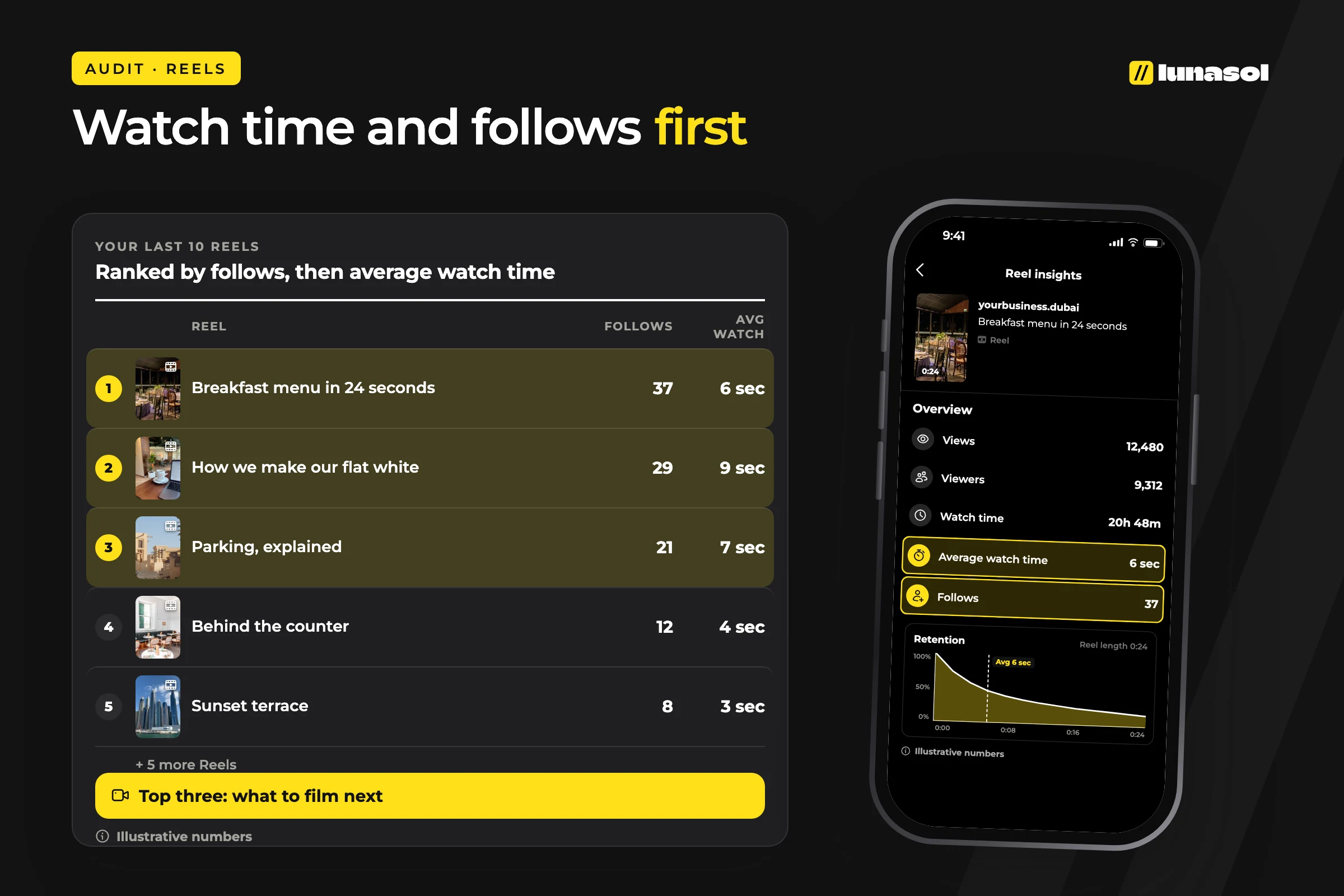
For Reels, look at average watch time and follows before you look at views. Views tell you Instagram showed the Reel. Watch time and follows tell you people cared.
Here's how Instagram defines its Reels metrics:
| Metric | Instagram's definition (summarised) | What to look for |
|---|---|---|
| Views | The number of times your Reel starts to play or replay | Your normal range, so outliers stand out |
| Viewers | Unique accounts that saw the Reel on screen at least once, whether or not it played | Growth in people reached, not just replays |
| Watch time | Total time the Reel was played, including replays | Which topics hold attention |
| Average watch time | Watch time divided by initial views | Compare it with the Reel's length |
| Follows | Accounts that started following you after viewing the Reel | The Reels that win new followers |
Our rule of thumb: rank your last 10 Reels by follows, then by average watch time. The top three tell you what to film next. Reel insights stay available for up to two years after posting, so you can compare this quarter with last year.
If average watch time is a small fraction of the Reel's length, look hard at the first three seconds and at production quality. On every Lunasol plan, including Essential, our team films with a professional camera, lighting and lenses, and adds captions and music in the edit.
5. Engagement and reply speed: are people talking, and are you answering?
Check two things: how many people interact with your content, and how long they wait for an answer. Instagram reports the first. The second you test yourself.
Instagram defines Interactions as actions people take when they engage with your content, such as likes, comments, saves and shares. Accounts engaged is the number of unique accounts that interacted with your content.
- Note interactions and accounts engaged for the last 30 and 90 days.
- For posts, stories and Instagram Live, Instagram splits accounts engaged into followers and non-followers. A healthy share of non-followers means your content travels.
- Open your DM inbox and "Message requests". Count unanswered messages older than one working day.
- Ask a friend to send a real question by DM and by WhatsApp. Time the reply.
Instagram Insights doesn't show a reply-speed score, so set your own target and test it. We reply to enquiries within 1 hour during working hours, and we'd suggest that as the minimum for any business that takes enquiries on Instagram. Message requests is the folder where enquiries go to be forgotten.
6. UAE compliance: do you need an advertiser permit?
If you pay or gift creators to post about your business, check that each one holds the Advertiser Permit from the UAE National Media Authority (NMA). The NMA says its individual permit covers content published "either for compensation or free of charge".
The NMA service page lists the permit as free for the first three years, then AED 1,000. Whether a company's own brand account needs one is less clear in official guidance, so we cover the grey areas in our UAE Advertiser Permit guide.
| Check | Relevant if | Status |
|---|---|---|
| Every paid or gifted creator holds the NMA Advertiser Permit | You work with influencers or creators | Pass / Fix / Not relevant |
| Property ads show the Trakheesi permit number and QR code | You are a Dubai real estate brokerage or developer | Pass / Fix / Not relevant |
| Creator posts you paid for carry Instagram's paid partnership label (Meta lists these in its Ad Library) | You run branded content with creators | Pass / Fix / Not relevant |
| Someone named is responsible for checking permits before posting | Always | Pass / Fix |
Property businesses have one more layer: see our guide to the Trakheesi permit for Instagram and TikTok listings. This section is general information, not legal advice, so confirm your case with the NMA.
7. Ads: what's live, and who owns it?
Open the Meta Ad Library, search your Page name and see what's running. Meta says the Ad Library "contains all active ads" shown across its technologies, and anyone can search it, according to Meta's Business Help Center.
- Are any old offers still running? Switch them off.
- Does each ad send people to a working page or WhatsApp number?
- Search two competitors too. You'll see their current ads, which is free research.
- Check who owns the ad account and the Instagram account. It should be your business, with the agency added as a partner. More on this in who should own your marketing accounts.
8. Reporting: can you see what changed?
A good report shows the same few numbers every month, compares them with last month, and says what will change next. If you can't tell whether things are better than last quarter, the reporting has failed.
Use Instagram's own metric names so nothing gets lost in translation: views, viewers, interactions, accounts engaged and new followers (plus follows for each Reel). Then add the number that pays the bills: enquiries from social (DMs, WhatsApp chats, calls, form fills).
Export your numbers every quarter. Instagram lets you choose timeframes within the past 90 days for account insights, so if you don't save them, older account data is harder to compare.
Use the audit to judge an agency
When you're choosing a Dubai digital marketing agency, ask each one to audit one of your accounts before you sign. A good agency will find specific problems, like a mismatched phone number, a Reel format that wins follows, or a creator without a permit. A weak one will tell you to "post more consistently".
Look for three things in their answer: they used real numbers from your Insights, they flagged UAE rules unprompted, and they told you who will film and run the account. Our guide on how to choose a social media agency in Dubai has the full list of questions to ask.
The trade-off is honest: an audit is a snapshot. It tells you what's wrong today, not whether a team can fix it every month. That's what the questions in that guide are for.
Frequently asked questions
How do I audit my Instagram account?
Open your profile from a friend's phone and check your bio, link and contact buttons. Then open Insights and note views, viewers, interactions, accounts engaged and new followers for the last 90 days, and rank your last 10 Reels by follows and average watch time.
What should a social media audit check?
A social media audit should check eight areas: profile and bio, a name, address and phone match with your Google Business Profile, content mix, Reels performance, engagement and reply speed, UAE compliance such as the NMA Advertiser Permit, ads, and reporting.
How often should I do a social media audit?
Do a full audit once a quarter and a quick profile check every month. Instagram's account insights cover timeframes within the past 90 days, so a quarterly audit lets you save each period before it drops out of view.
Is there a free social media audit template?
Yes. Lunasol's free Google Sheets template has one tab per platform, a tab for checking your Google Business Profile details, and a summary of fixes. Enter your email in the download box above and we'll send you a copy.
What should I look for when choosing a Dubai digital marketing agency?
Ask each agency to audit one of your accounts and price the same brief. Choose the one that uses your real numbers, raises UAE rules such as the NMA Advertiser Permit without being asked, names who will film and run your account, and leaves you owning your accounts.
Want a second pair of eyes?
Run the checklist yourself first. If the "Fix" column gets long, our Essential plan starts with a profile audit and set-up, and our team films your content with a professional camera, lighting and lenses on every plan. See how we work as a social media marketing company in Dubai, or message us on WhatsApp and we'll reply within 1 hour during working hours.
Sources
- Instagram Help Center: About Instagram insights (opened 23 Nov 2026). facebook.com
- Instagram Help Center: View insights on your Instagram reels (opened 23 Nov 2026). facebook.com
- Meta Business Help Center: About the Meta Ad Library (opened 23 Nov 2026). facebook.com
- Google Business Profile Help: Guidelines for representing your business on Google (opened 23 Nov 2026). support.google.com
- UAE National Media Authority: Permit for an individual to provide advertising or media content on social media (opened 23 Nov 2026). nma.gov.ae